Quick answer: to convert a ZIP file to an APK, zip your web project so that
index.htmlis at the top level of the archive, upload the ZIP to the ZIP to APK builder, enter an app name, a launcher icon, a package name and a version, and start the build. Two to five minutes later you download a signed APK that installs on any Android phone. Nothing is installed on your computer and your HTML, CSS and JavaScript are not changed.
That is the whole process. The rest of this guide is each step in the order you meet it, the two settings you can never change afterwards, and what to do when the app first opens.
What you need before you start
- A folder of web files with an
index.htmlin it — hand-written, exported from a site builder, or the production build of a framework. - A square logo, ideally 1024 × 1024 PNG. Every icon size is generated from it.
- A package name in reverse-domain form, such as
com.yourname.recipes. The App ID Generator makes a valid one from the app's name. - A Google account to sign in to the builder. That is all; no card.
Step 1 — Zip the project correctly
The one rule that matters: index.html must be at the root of the ZIP, not inside a folder. Open the folder that contains index.html, select everything inside it, and compress the selection. Do not compress the folder itself — that produces my-site/index.html, and the app has no entry page.
| Correct archive | Wrong archive |
|---|---|
index.html css/style.css js/app.js images/logo.png pages/about.html | my-site/index.html my-site/css/style.css my-site/js/app.js my-site/images/logo.png my-site/pages/about.html |
Everything else is copied exactly as zipped: sub-folders, extra pages, images, fonts, JSON. Use relative paths between files (css/style.css, not /css/style.css) and load scripts with a plain <script src> rather than type="module". The zipping guide goes through the layout in detail.
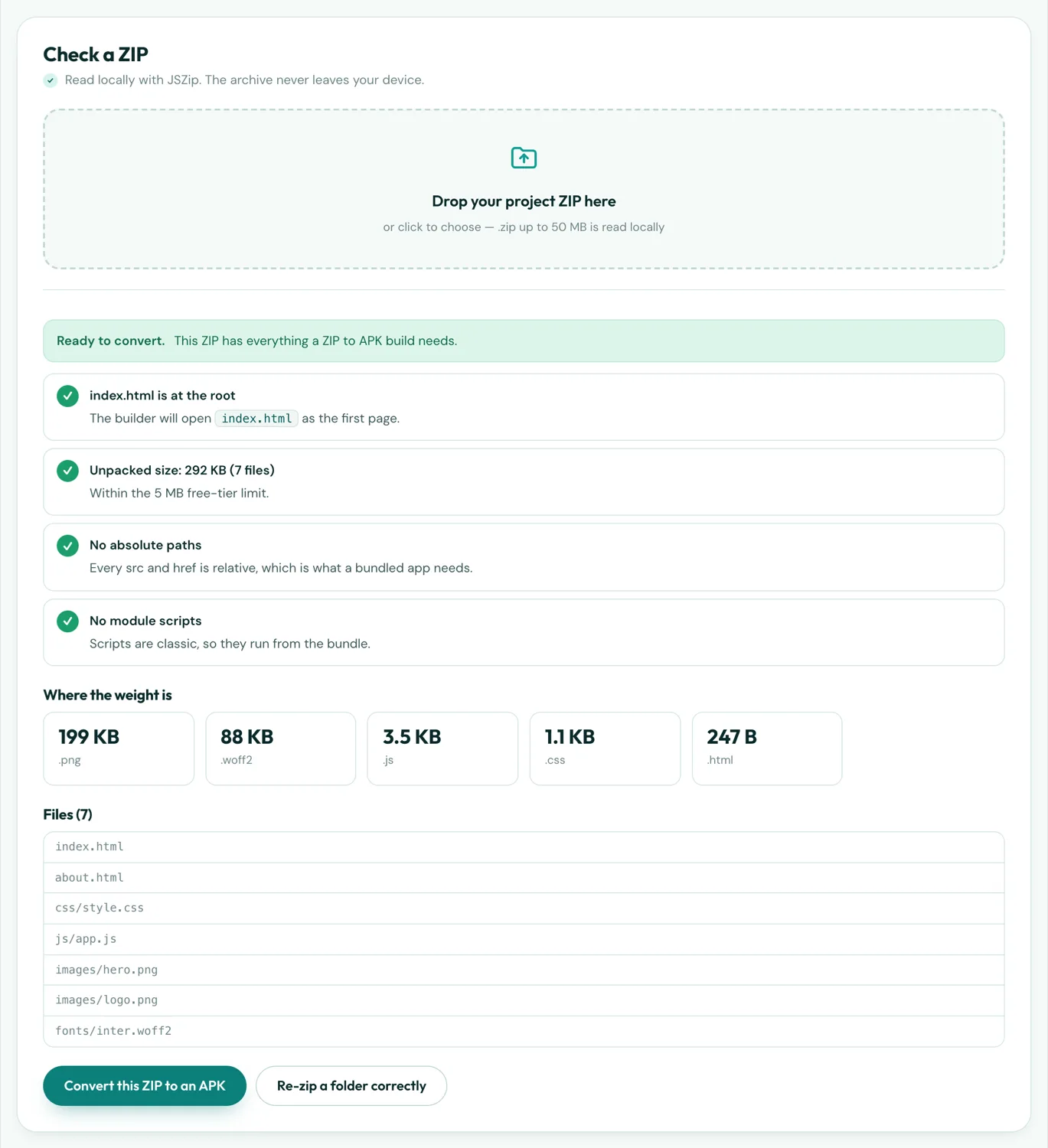
Run the archive through the checker if you want certainty before signing in:
Step 2 — Upload the ZIP
Open the builder, sign in with Google, and choose ZIP file as the source. Drop the archive. The builder unpacks it, locates index.html, measures the content against the upload limit (5 MB free, 18 MB Pro) and lists anything it found that will break inside an app. Fix what it flags, re-zip and upload again; each check is instant, the build is not.
Step 3 — Name, icon, package name, version
Four fields, two of which are permanent.
- App name — what appears under the icon. Up to 30 characters; change it any time.
- Icon — upload the square logo. The builder generates every launcher size and the adaptive icon. Preview it first with the APK Icon Maker if you want to see how it survives the circular mask.
- Package name — permanent. Android and Google Play identify the app by it; change it and you have a different app. Lowercase, dot-separated, no reserved words:
com.yourname.recipes. - Version — a
versionNamepeople see ("1.0") and aversionCodeinteger that must rise with every build. Start at 1.
Each field is validated as you type, so a bad package name fails in a second rather than after a five-minute build. Pro adds a splash screen, native bottom tabs, onboarding screens, push notifications and your own signing key here; the free tier skips them and builds a plain full-screen WebView app, which for most ZIP projects is exactly right.
Step 4 — Build and download
Press build. A real Android project is generated around your files — manifest, resources, icon set, WebView activity — and compiled in the cloud. Progress is shown; you can close the tab and come back. When it finishes you get a signed APK to download. Pro builds also produce an AAB, the format Google Play requires for new apps; the Play guide explains why both exist.
Step 5 — Install it on a phone
Send the APK to the phone — email it, upload it somewhere and share the link, or make a QR code for it. Open the file on the phone. Android asks two things the first time: permission for the browser (or the file manager) to install unknown apps, and a Play Protect notice that the app is from an unknown developer, with "Install anyway". Both are normal for any app not distributed through Google Play. The installation guide has the exact taps for each Android version.
The app opens straight into your index.html, full screen, with no browser chrome. Links between your pages work, images and styles load from inside the APK, and there is no loading spinner because nothing is fetched.
What to expect from the result
| Question | Answer |
|---|---|
| How big is the APK? | Your content after compression plus about 2.6 MB of runtime. A typical ZIP site is a 4–8 MB APK. The size estimator predicts it. |
| Which Android versions? | 7.0 (2016) and newer — effectively every phone in use. |
| Does it work offline? | Yes, entirely. See what works offline for the few browser features that behave differently on bundled pages. |
| Can I update it? | Yes — new ZIP, same package name, higher versionCode, rebuild. The updating guide. |
| Is there a watermark or expiry? | No. Free-tier APKs are signed, complete and permanent. |
| iOS? | No. Android only. |
Checklist
- index.html at the root of the ZIP
- Relative paths everywhere; no
/prefix - No
type="module"scripts - Content under 5 MB (free) or 18 MB (Pro)
- Square 1024 px logo ready
- Package name decided — you cannot change it later
- versionCode 1 for the first build, higher for every rebuild